Taking a perfectly framed photo in a crowded tourist spot is practically impossible. You wait ten minutes for the perfect lighting, and right as you hit the shutter, a random guy walks directly into the frame. It is absolutely infuriating. But instead of trashing the photo and giving up, what if you could just wipe away the photobombers like they were never there? That’s exactly why you need Magic Eraser – Remove Objects on your phone right now. It takes those totally ruined shots and instantly saves them with almost zero effort on your part.
ADVANCED OBJECT REMOVAL
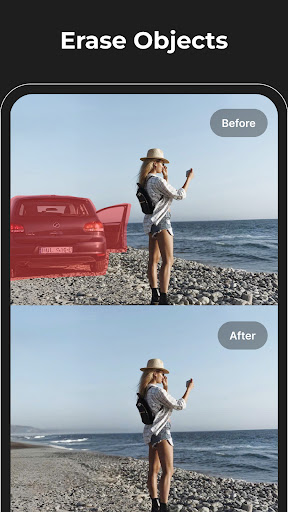
Manually cloning out a garbage can or a stray tourist used to take hours of tedious work in heavy desktop software. Now? You just swipe your finger over the mess, and the AI handles the rest.
The technology under the hood aggressively analyzes the background and fills in the blank space so naturally that nobody will ever know something was erased. Got an annoying watermark, a weird blemish, or a random power line completely ruining the vibe? Just tap it, and it vanishes without leaving those ugly, blurred smudge marks behind. Once you clean up the clutter, you can quickly slap on a built-in filter to make the colors pop before you upload it to your feed.
BACKGROUND REMOVAL EXCELLENCE
Wiping out a random trash can isn’t even the best part. The background removal tool is honestly on another level.
We’ve all used those cheap cutout apps that leave jagged edges and weird halos around your hair, right? This engine actually separates your main subject from the background with ridiculous precision. You get a flawlessly clean cutout that you can instantly drop onto a totally different scene. Whether you are throwing together a quick meme for your group chat or designing a professional product poster for your side hustle, it takes maybe three taps. It completely eliminates the need to learn ridiculously complicated editing software just to get a clean transparent background.